

These recommendations for the Course Navigation Menu are based on a review of User Experience (UX) studies and experiences of Mizzou Online faculty and instructional designers. While the needs of each course may differ, overall we recommend (1) minimizing navigation elements and (2) using Modules to organize all content and assignments. We also discuss navigation links created specifically for the University of Missouri System and include Canvas resources.
This screen capture is the Instructor’s View, which shows both enabled links (in the red box) and disabled links. The latter have an icon indicating that the links are not visible to students.
Recommendations
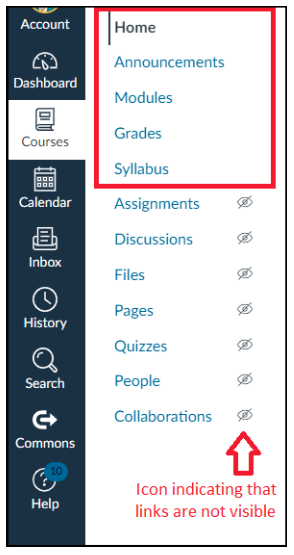
We recommend enabling the following links to support student learning, reduce cognitive load and meet (some) design preferences of students:
- Home, which has five layout options
- Announcements
- Modules
- Grades
- Syllabus
Because we recommend using the Modules area to organize all content and assignments, we exclude links to most other Canvas areas, including Assignments, which students in a Penn State study ranked as the most important navigation item. Students tend to use the Assignments page to bypass Module content that instructors consider essential to student learning. Students also use links to assignments in Grades and the Syllabus course summary for this purpose. Adding Requirements to a module will require students to view all items in the module.
Individual Considerations
Consider including additional links based on the priorities and needs of your course.
- For instance, if you want students to frequently revisit Discussions to reply to peers, you may consider adding it to the navigation.
- Integrated tools such as Zoom, Panopto and Office 365 might be useful to include based on your course needs.
- Each university campus offers navigation options such as MU’s Support & Policies.
Key Resources
How do I manage Course Navigation links? | Canvas Guides
Remember to click the Save button at the bottom of the Course Navigation settings page.
Modules Overview for Instructors | Canvas Guides
Surrency, Monica. (2021). Examining Usability, Navigation, and Multimedia Learning Principles in an Intentionally Designed Asynchronous Online College Course: A Usability Study.
The Pennsylvania State University (2017). Report: SP17 Pilot Results (AKA The Pilot Has Landed). PSU Canvas UX. Retrieved May 16, 2023, from https://sites.psu.edu/canvasux/2017/06/27/report-sp17-pilot-results-aka…